
Modbus Test Tools
Simply Modbus tools are high-level software simulators used for testing,
diagnosing, and debugging Modbus communication.
Each tool is designed for a different purpose. Choose the tool that fits your application.

TCP Client
Connect to Modbus TCP devices
over Ethernet TCP/IP networks.
Key Features
- Your PC becomes a
Modbus TCP Client or
Modbus RTU-over-TCP Master - Connect to slave devices
through your PC's Ethernet port - Sent requests and
view received data - Sent write commands to
change slave data - Supports multiple function codes
FC 01,02,03,04,05,06,15,16 - Save and load configurations
- Log data for later analysis
Use Cases
- Training and education
- Troubleshoot TCP/IP Modbus communication
- Send requests to
Modbus TCP Servers
(slave devices) to verify: - slave devices are
alive and responding - IP Addresses
- data addresses and formats
- register contents

RTU/ASCII Master
Communicate with Modbus slave
devices on a serial network
(RS232C or RS485)
Key Features
- Your PC becomes a
Modbus RTU Master or
Modbus ASCII Master - Connect to slave devices
though your PC's serial port - Sent requests and
view received data - Sent write commands to change slave data
- Supports multiple function codes
FC 01,02,03,04,05,06,15,16 - Save and load configurations
- Log data for later analysis
Use Cases
- Training and education
- Troubleshoot serial communication
- Send requests to
Modbus RTU or ASCII
slave devices to verify: - slave devices are
alive and responding - slave IDs are correct
- wiring and signal converters
- serial settings,baud rate etc.
- data addresses and formats
- register contents
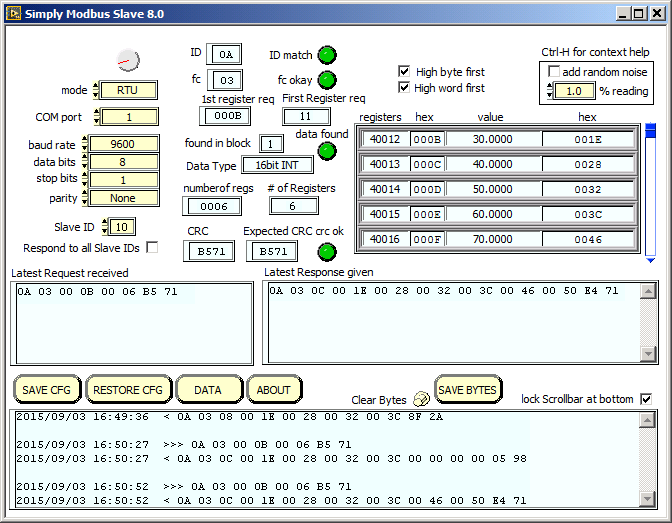
RTU/ASCII Slave
Simulate a Modbus slave device
on a serial network
(RS232C or RS485)
Key Features
- Your PC becomes a
Modbus RTU Slave or
Modbus ASCII Slave - acts as a "soft PLC," allowing you to test SCADA or HMI systems without the actual physical hardware.
- Monitors for requests from
an RTU/ASCII Master device - When it sees a request it verifies the slaveID and ensures the requested data exists it its tables, then replies to the master with the data
- Supports multiple function codes
FC 01,02,03,04,05,06,15,16 - Save and load configurations
Use Cases
- Training and education
- Troubleshoot serial communication
- Test Modbus master software
- View Master request messages
- Simulate a field device for Modbus master development