
Modbus RTU/ASCII Slave Tool
Overview
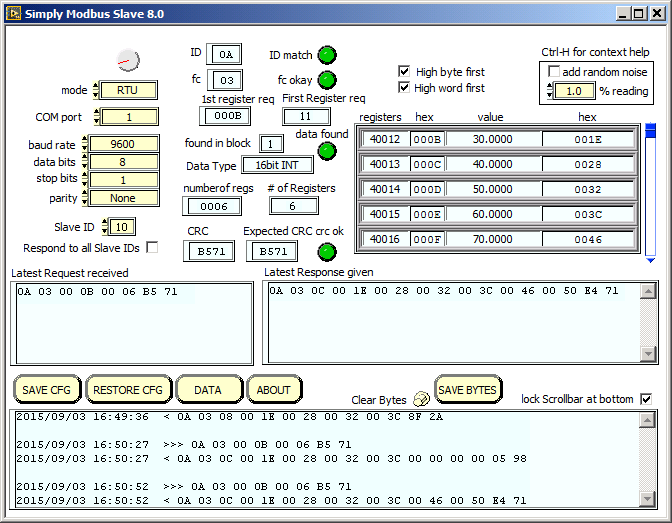
This test tool allows your Windows PC to simulate a Modbus RTU or Modbus ASCII slave device.
It is used to test, troubleshoot, and monitor Modbus serial communication.
It monitors a serial port looking for an incoming request message from a Modbus Master.
Once received, it builds and sends a reply using data from it's tables.

Key Features
- Functions as a Modbus RTU Slave or Modbus ASCII Slave
- Replies to an RTU or ASCII master device when querried.
- Settings are entered and displayed in one window with a 2nd window for the data
- Supports Standard Modbus and Enron Modbus registers
- Supports adding random noise to emulate live data
- Supports responding to all slave IDs to simulate many slaves
- Save and restore settings in configuration files
- Save Byte History Log to a text file
16 bit Register Function Codes
| Function Code | Action |
|---|---|
| 04 | Read Input Registers |
| 03 | Read Holding Registers |
| 06 | Write Single Holding Register |
| 16 | Write Multiple Holding Registers |
1 bit Coil Function Codes
| Function Code | Action |
|---|---|
| 02 | Read Discrete Inputs |
| 01 | Read Coils |
| 05 | Write Single Coil |
| 15 | Write Multiple Coils |
Download
The free download has full functionality and runs in demonstration mode until licensed.
Demonstration mode had full functionality but limits sending of response messages to the master to six.
It can then be restarted to send more messages.
Download and run in demonstration mode. Try before you buy.
System Requirements:
Windows XP SP3 (32-bit), Vista, Windows 7, Windows 8, Windows 8.1, Server (2008 R2 and 2012 R2)
Windows 10 (Unsupported but Pragmatically Functional)
Windows 11 (LabVIEW 2014 will not run reliably, NI-VISA 14.0: completely incompatible
display resolution: 800 x 600 minimum
PC with serial port (built in, serial card or USB serial port)
Simply Modbus RTU/ASCII Slave 8.1.3
Looking for older versions of the software? View legacy versions
Purchase
Licenses are available for single users, multiple users, or site licenses.
Purchase License