
Introduction to Modbus Protocol
What is Modbus?
Modbus is a communication protocol developed by Modicon in 1979 for industrial automation systems.
It is used to communicate between devices such as PLCs, sensors, instruments, and computers.
Modbus has become a standard communication protocol in industry
and is commonly used in SCADA systems, data acquisition, and industrial control.
What is Modbus used for?
Modbus is an open-standard communication protocol used to connect electronic devices
in industrial automation, building management systems (BMS), and SCADA networks.
It enables a master controller (PLC or computer) to read/write data to slave devices
like sensors, drives, and meters via serial (RS-485 or RS-232) or Ethernet (TCP/IP) connections.
Primary Applications of Modbus:
- Industrial Automation: Connecting Programmable Logic Controllers (PLCs) with sensors, motor drives (VFDs), and input/output modules.
- Building Management (BMS): Monitoring and controlling HVAC, lighting, and power metering systems.
- SCADA Systems: Connecting a central supervisory computer to Remote Terminal Units (RTUs) or Programmable Logic Controllers (PLCs) in remote infrastructure.
- Data Acquisition: Enabling sensors (temperature, pressure, humidity) to send data to a central computer.
How Modbus Works

Modbus is a master-slave (client-server) communication protocol that allows a single client (e.g., PLC, SCADA) to request data from up to 247 slave devices (e.g., sensors, drives) over serial lines (RS-485/232) or Ethernet. The client sends queries containing a device address, function code, and data, while servers only respond to requests to read/write data in registers.
How is data transmitted?

Modbus is transmitted over serial lines between devices. The simplest setup would be a single RS232 serial cable connecting the serial ports on two devices, a Master and a Slave.
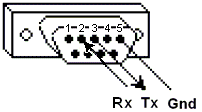
 >
>
The data is sent as series of ones and zeroes called bits. Each bit is sent as a voltage. Zeroes are sent as positive voltages and a ones as negative. The bits are sent very quickly. A typical transmission speed is 9600 baud (bits per second).
What is hexadecimal?
When troubleshooting problems, it can be helpful to see the actual raw data being transmitted. Long strings of ones and zeroes are difficult to read, so the bits are combined and shown in hexadecimal.
| 0000 = 0 | 0100 = 4 | 1000 = 8 | 1100 = C |
| 0001 = 1 | 0101 = 5 | 1001 = 9 | 1101 = D |
| 0010 = 2 | 0110 = 6 | 1010 = A | 1110 = E |
| 0011 = 3 | 0111 = 7 | 1011 = B | 1111 = F |
Each block of 4 bits is represented by
one of 16 hexadecimal characters from
0 to
F.
Each byte ( 8 bits ) is represented by
one of 256 pairs of hexadecimal characters from
00 to
FF.
What is ASCII?
ASCII (American Standard Code for Information Interchange)
is a character encoding standard that assigns a
unique character to the numerical values 0-255 (code points),
The characters include English letters, digits, punctuation, and control codes.
Each byte ( 8 bits ) is represented by
one of 256 individual ASCII characters.
Strict ASCII is 7-bit and only defines characters from 0–127.
However, using 8 bits allows characters for values 128–255 as "Extended ASCII".
There are multiple standards defining the Extended ASCII character set.
Our examples (ASCII 174 = ®) use Windows-1252 / ISO-8859-1 (Latin-1),
which is what most modern systems and browsers assume.
For example, some of the values for ASCII characters are...
| Decimal (base10) |
Binary (base2) |
Hexadecimal (base16) |
ASCII (base256) |
|---|---|---|---|
| 0 | 0000 0000 | 00 | null |
| 1 | 0000 0001 | 01 | " |
| 34 | 0010 0010 | 22 | # |
| 35 | 0010 0011 | 23 | $ |
| 36 | 0010 0100 | 24 | % |
| 47 | 0010 1111 | 2F | / |
| 48 | 0011 0000 | 30 | 0 |
| 49 | 0011 0001 | 31 | 1 |
| ... | ... | ... | ... |
| 56 | 0011 1000 | 38 | 8 |
| 57 | 0011 1001 | 39 | 9 |
| 58 | 0011 1010 | 3A | : |
| 64 | 0100 0000 | 40 | @ |
| 65 | 0100 0001 | 41 | A |
| 66 | 0100 0010 | 42 | B |
| ... | ... | ... | ... |
| 89 | 0101 1001 | 59 | Y |
| 90 | 0101 1010 | 5A | Z |
| 91 | 0101 1011 | 5B | [ |
| 95 | 0101 1111 | 5F | _ |
| 96 | 0110 0000 | 60 | ` |
| 97 | 0110 0001 | 61 | a |
| ... | ... | ... | ... |
| 122 | 0111 1010 | 7A | z |
| 123 | 0111 1011 | 7B | { |
| 174 | 1010 1110 | AE | ® † |
| 255 | 1111 1111 | FF | ÿ † |
† ISO-8859-1 (Latin-1) / Windows-1252 Extended ASCII